
Sonauto
Sonauto is a free web-based AI music generator for turning prompts, tags, or lyrics into songs, with a developer API for generation, extensions, inpainting, and format control.
The Complete Beginner's Guide to Sonauto: AI Music Generator
Introduction
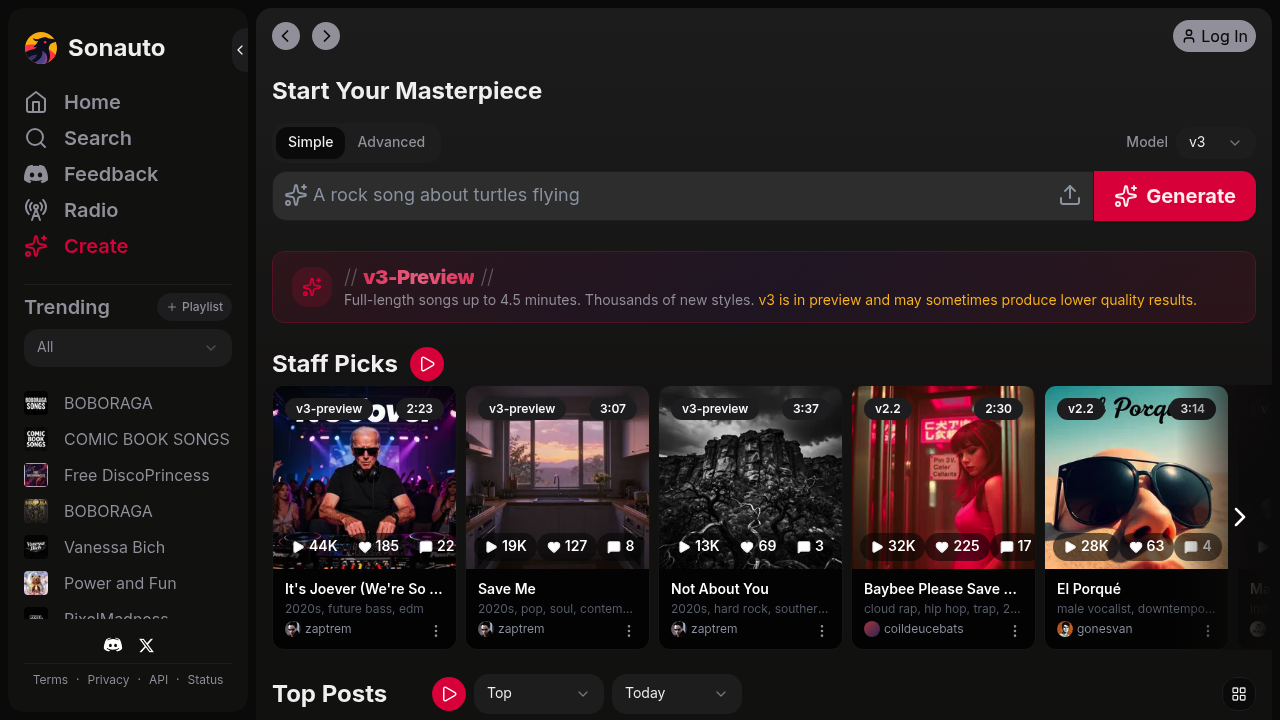
Sonauto is a browser-based AI music generator that turns prompts, tags, and lyrics into finished songs with vocals or instrumentals. It is built for fast idea-to-audio workflows, so it works well for musicians testing hooks, marketers creating rough campaign music, indie teams prototyping soundtracks, and creators who want a quick draft before moving into a full DAW.
What makes Sonauto notable is the mix of a free consumer website and a more technical developer API. The public site focuses on instant generation, while the developer docs expose deeper controls such as prompt strength, lyrics alignment, multiple export formats, and edit-style endpoints for extending or inpainting a track.
Pricing Plans
Sonauto states that generating songs on the main website is free. For the API, new accounts receive a free trial of 1,500 credits, and the docs say one 1 minute 35 second song costs 100 credits. Public API plans listed on the developer page include $11/month for 20,000 credits, $88/month for 160,000 credits, $330/month for 660,000 credits, and $1,150/month for 2,875,000 credits, plus pay-as-you-go credits. Prices are subject to change. Official pricing: https://sonauto.ai/developers#pricing.
Getting Started
Sonauto runs in the browser, so there is no Windows, macOS, or Linux installer advertised on the public site. In practice, you need a modern browser, an internet connection, and an account for saved work. For developers, Sonauto also offers a bearer-token API at https://sonauto.ai/developers, which makes the access model web-first with optional programmatic integration.
The interface is simple: start from a prompt or lyrics, generate a track, then refine from there. If you are technical, the API docs are worth reading early because they explain generation statuses, webhooks, output formats, and the difference between the v2 and v3 models.
Core Features
Prompt, tag, and lyrics-based generation: Sonauto requires at least one of tags, lyrics, or a prompt for API generation. That gives you a flexible starting point for broad ideation or more directed songwriting.
Instrumental and vocal workflows: The docs explicitly support instrumental generations by setting the instrumental option and omitting lyrics. That makes Sonauto useful for background music, draft backing tracks, and vocal-led songs alike.
Extend and inpaint editing: Sonauto is not limited to one-shot generation. Its documented extend and inpaint endpoints let you continue an existing song or replace a selected section instead of starting over.
Technical export controls: Supported output formats include mp3, flac, wav, ogg, and m4a. For mp3 and m4a, Sonauto also documents bitrates of 128, 192, 256, and 320 kbps, plus lyrics alignment for word-level timing data.
First Project Tutorial
Start with a focused prompt such as “melodic indie pop with warm synths, female vocals, hopeful chorus” instead of something vague. If you already have lyrics, paste them in so the model has clearer structure and theme. Stronger prompts usually come from naming genre, mood, and vocal intent without piling on too many conflicting instructions.
After the first result, check whether the arrangement matches your style, whether the vocal tone fits the use case, and whether the song feels complete enough for a demo. If the core idea is good but one section is weak, Sonauto's extend or inpaint workflow is the next logical step. Developers can also choose export format and bitrate early so files are easier to review or edit later.
If the output feels generic, simplify the prompt rather than adding more random adjectives. The docs also note that higher prompt strength follows your instructions more closely but can sound less natural, so that setting is worth testing carefully in API workflows.
Best Practices & Optimization
Use Sonauto as a fast ideation layer rather than expecting every first pass to be release-ready. It is especially good for testing lyrical concepts, sketching song directions, and producing rough references for clients or collaborators. Teams using the API should standardize prompt templates and export settings so they can compare generations more consistently.
Avoid overstuffed prompts, and remember that the docs say generated song URLs are temporary rather than permanent. If you create something worth keeping, download it instead of treating the delivery URL as long-term storage.
Pros and Cons
Pros: Free website generation lowers the barrier to experimentation. The API offers useful controls for developers, including extend, inpaint, streaming support for v3, and multiple export formats.
Cons: Sonauto does not publicly advertise desktop apps or plugin integrations, so the workflow is web-centric. Like most AI music tools, output quality still depends heavily on prompt clarity and human review.
What Users Are Saying: Real Reviews & Feedback
Community feedback around Sonauto is mixed but informative. Hacker News discussions praise the platform's controllability, free experimentation, and API potential for music-related products. The main criticism is that musicians still want more interactive assistance and deeper workflow integration, not just one-click full-song generation.
- Show HN: Sonauto – A more controllable AI music creator
- Show HN: Sonauto API – Generative music for developers
- HN discussion: copyright ownership for Sonauto API outputs
The clearest positive signals are fast iteration, technical flexibility, and a low-friction way to test ideas. The biggest reservations are UI maturity and the broader creative limits that come with AI-generated music. Have you tried Sonauto? Share your experience in the review section below to help other creators make the right choice.
Summary
Sonauto is a useful option if you want free web-based AI music generation with a serious API behind it. Beginners can use the browser app for fast testing, while technical users get extend, inpaint, export, and streaming controls that make the platform more than a simple prompt box. Its core strengths are accessibility and iteration speed, while its limits are the usual ones for AI music: prompt sensitivity, workflow maturity, and the gap between a usable draft and a final release.
Reviews
No reviews yetSimilar tools in category

Descript
Transform content creation with user-friendly editing, AI-powered tools, and effortless collaboration.
iZotope RX
Enhance audio quality with machine learning-based repair and instant cleanup.

Krisp
Achieve clear online communication with AI-powered noise reduction and live meeting transcription.