Ultimate Vocal Remover
Ultimate Vocal Remover (UVR) is a free, open-source desktop application that uses deep neural networks to separate vocals, instrumentals, drums, and other stems from audio files. Available for Windows, Mac, and Linux with GPU acceleration and multiple AI model architectures including MDX-Net, VR Architecture, and Demucs v4.

Ultimate Vocal Remover: Free AI Audio Editor for Stem Splitting and Vocal Separation (2026)
Ultimate Vocal Remover (UVR) is a free, open-source desktop application developed by Anjok07 that uses deep neural networks to separate vocals, instrumentals, drums, bass, and other stems from any audio file. Unlike browser-based tools with file size caps and subscription paywalls, UVR runs entirely on your local machine — processing audio using your GPU without sending data to any server.
UVR is best suited for music producers, DJs, audio engineers, and content creators who need high-quality stem separation without recurring costs. Its MDX23C-InstVoc HQ model consistently outperforms most paid alternatives for vocal isolation on complex rock and pop recordings. It supports multiple AI architectures (VR Architecture, MDX-Net, Demucs v3/v4) and allows GPU-accelerated batch processing.
If you need a lightweight, no-install, browser-based solution or require cloud processing for mobile workflows, UVR is not the right fit — it demands a moderately powerful GPU (minimum Nvidia GTX 1060 6GB) and a desktop environment on Windows, Mac, or Linux.
Ultimate Vocal Remover: Key Specs at a Glance
| Feature | Ultimate Vocal Remover (UVR) |
|---|---|
| Primary use case | Vocal separation, stem splitting, audio source separation |
| Best for | Music producers, DJs, audio engineers, remix creators |
| Access type | Desktop application (Windows, Mac, Linux) |
| AI model | Multiple: VR Architecture (custom-trained), MDX-Net, Demucs v3/v4; MDX23C-InstVoc HQ is the flagship model |
| Input formats | WAV, FLAC, MP3 (requires FFmpeg for non-WAV) |
| Output formats | WAV, FLAC, MP3 |
| Max file / duration | No hard cap; processing time depends on hardware and segment size settings |
| Processing type | Local batch processing; GPU-accelerated (not real-time) |
| Output quality | Up to source quality; output sample rate mirrors input |
| Language support | N/A (audio processing tool, no speech recognition) |
| API availability | No public API; CLI usage possible via Python scripts |
| DAW / plugin support | Standalone only; no VST/AU plugin |
| Collaboration | No |
| Pricing model | Free and open-source (MIT license) |
| Free plan | Yes — fully free, no feature restrictions |
| Paid plans | None; voluntary donations accepted via Buy Me a Coffee |
What Ultimate Vocal Remover Does Well
Multiple AI Model Architectures in One Interface
UVR bundles three distinct AI architectures — VR Architecture (custom-trained by core devs), MDX-Net (based on Kuielab's research), and Facebook's Demucs v3/v4 — all accessible from a single GUI. You can switch models without reinstalling anything and run ensemble processing using outputs from multiple models for improved separation quality on difficult tracks. This level of model flexibility is rare even in paid tools.
GPU-Accelerated Local Processing with No Data Uploads
UVR processes all audio locally on your machine using Nvidia CUDA (or Apple M1 MPS for Mac users). There are no file size limits imposed by a server, no subscription throttling, and no privacy concerns about uploading proprietary audio tracks. For studios working with unreleased material, this is a significant operational advantage over cloud-based alternatives.
Advanced Stem Separation Beyond Vocals and Instrumentals
Demucs v4 integration enables 4-stem separation (vocals, drums, bass, other) in a single pass, while custom MDX-Net models can isolate specific instruments across a range of genres. Additional tools include time-stretching and pitch-shifting via the Rubber Band library, making UVR useful beyond simple vocal removal — it functions as a full audio decomposition workstation.
Known Limitations
- Output artifacts on complex mixes: Heavily layered productions with dense mid-range frequencies — common in electronic and orchestral music — can introduce audible artifacts, bleeding, and tonal smearing even with the best models. No AI separator eliminates this risk entirely.
- GPU requirement makes it inaccessible on budget hardware: A minimum Nvidia GTX 1060 6GB is required for GPU-accelerated processing. CPU-only mode is possible but extremely slow for longer tracks. Users on integrated graphics or older hardware will experience significant processing delays.
- No browser-based or mobile access: UVR is desktop-only. There is no web interface, iOS app, or Android version. For mobile workflows or quick browser-based separation, tools like Lalal.ai or Moises are more suitable.
- Mac installation complexity: MacOS Sonoma users and Intel Mac users have reported click registration issues and notarization errors requiring manual Terminal commands to bypass Apple's security restrictions before UVR launches correctly.
- No DAW integration: UVR is a standalone application with no VST or AU plugin format. Stems must be exported as files and manually imported into your DAW, adding extra steps compared to plugin-based separators like iZotope RX.
- Windows installation path restriction: On Windows, UVR must be installed to the main C:\ drive. Installing to a secondary drive causes instability — an unusual constraint for a desktop application.
Best For: Who Should Use Ultimate Vocal Remover
- Music producers and DJs who need high-quality vocal removal for remix production and need full local control over audio assets without server uploads.
- Audio engineers working with unreleased or sensitive recordings where privacy and no-upload workflows are non-negotiable.
- Content creators who need clean instrumental backing tracks for YouTube, podcast beds, or video production without per-file credit costs.
- Musicians transcribing complex arrangements who use stem isolation to study individual parts from finished recordings.
- Open-source developers and researchers who want access to pre-trained separation models for experimentation or integration into custom pipelines.
Who Should Look Elsewhere
- Users who need browser-based access with no software installation — Lalal.ai or Moises.ai offer comparable quality for occasional use without a desktop setup.
- Developers who need a REST API for programmatic audio processing pipelines — UVR has no public API; AssemblyAI or cloud-based SDKs are better fits.
- Non-technical users on Mac who don't want to run Terminal commands to bypass macOS security — the installation experience on Apple Silicon is significantly more complex than on Windows.
Pricing & Cost at Scale
Plan Overview
- Free: Fully unlimited — all models, all output formats, batch processing, no file count or duration restrictions. The application is 100% open-source under MIT license.
- Donations: Optional support via Buy Me a Coffee (buymeacoffee.com/uvr5). No features are gated behind donations.
Cost at Scale
Solo creator / audio engineer: $0 indefinitely. Processing cost is your local electricity and hardware amortization only. For a 5-minute track on a mid-range GPU, processing typically takes 30–120 seconds depending on the model and segment size settings.
Small studio: $0 in recurring costs. Multiple team members can run their own instances; there are no per-seat licensing fees. Hardware investment (GPU upgrade) is the primary cost consideration.
High-volume developer: UVR has no API, so automated pipelines require wrapping the Python CLI directly. The cost remains $0 in software fees, but engineering time for integration is a real consideration. Cloud-based APIs like AssemblyAI or Demucs-as-a-service alternatives may be more operationally efficient at scale.
Pricing information is based on the official UVR GitHub repository and website as of May 2026. No paid tiers exist.
Technical Details & Integrations
- AI models included: VR Architecture (custom-trained by Anjok07 and aufr33), MDX-Net (Kuielab), Demucs v3/v4 (Facebook Research), MDX23C (ZFTurbo)
- GPU acceleration: Nvidia CUDA (GTX 1060 6GB minimum; 8GB+ VRAM recommended); Apple M1 MPS supported for Demucs v4 and all MDX-Net models; AMD ROCm support is in experimental branch
- Dependencies: Python 3.9–3.10, PyTorch, FFmpeg (for non-WAV input), Rubber Band (for time-stretch and pitch-shift)
- DAW integration: None — standalone only; stems must be exported as WAV/FLAC/MP3 files and imported manually
- License: MIT — free for personal and commercial use; third-party developers using models must credit UVR
- Workflow fit: Offline, local-first; best integrated into batch processing workflows where stems are exported and then imported into a DAW like Ableton Live, Logic Pro, or FL Studio
Getting Started
- Go to ultimatevocalremover.com and click "Download UVR" to access the GitHub releases page.
- Download the installer for your OS:
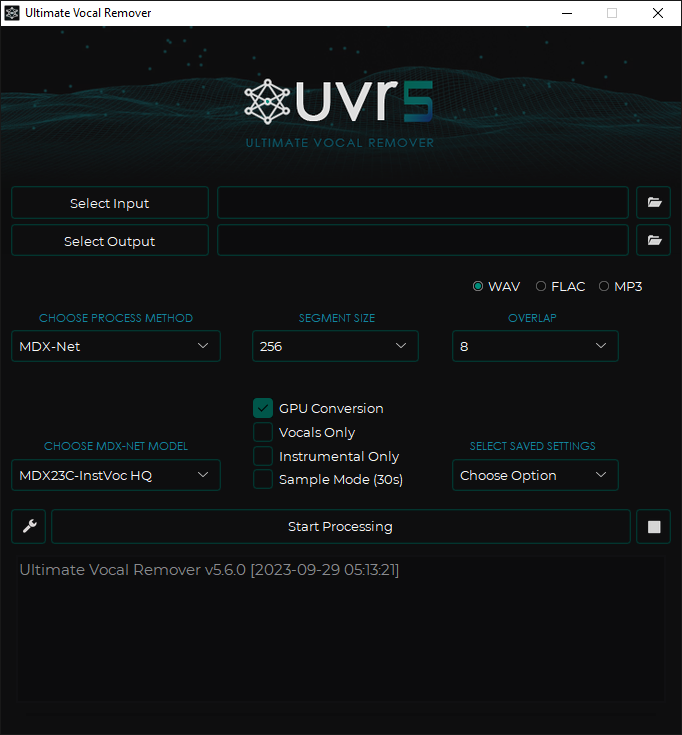
.exefor Windows (must install to C:\),.dmgfor Mac (M1 arm64 or Intel x86_64), or follow the manual Python setup for Linux. - Launch UVR, select your input file and output directory, then choose a process method. Start with MDX-Net and the MDX23C-InstVoc HQ model for best vocal/instrumental separation results on mainstream music.
- Click "Start Processing" and wait for the GPU to complete the separation. Output files appear in your chosen output directory.
- For 4-stem separation (vocals, drums, bass, other), switch to the Demucs model and select the htdemucs or htdemucs_ft variant for the highest quality output.
Pro tip: If you hear artifacts in the separated vocals, try adjusting the "Segment Size" slider — lower values reduce memory use but may change artifact patterns; running the same track through two different models and merging outputs in your DAW often yields cleaner results than any single model alone.
What Users Are Saying
UVR has earned a strong reputation in the audio production community, with users on Reddit consistently rating it above paid alternatives. The MDX23C-InstVoc HQ model in particular draws praise for its vocal isolation quality on rock and pop recordings.
What users praise: Zero cost, local GPU processing with no upload requirement, excellent vocal isolation quality with MDX23C-InstVoc HQ, support for multiple AI architectures, and batch processing capabilities.
Common frustrations: Installation complexity on Mac (especially Sonoma), GPU memory errors on lower-end cards requiring segment size tuning, no browser or mobile access, and occasional artifacts on complex mixes with dense layering.
Have you tried Ultimate Vocal Remover? Share your experience in the review section below to help other audio creators make the right choice.
FAQ
Is Ultimate Vocal Remover free?
Yes — UVR is completely free and open-source under the MIT license. All models, output formats, and processing features are available at no cost. The developers accept optional donations via Buy Me a Coffee, but no features are paywalled.
What audio formats does Ultimate Vocal Remover support?
UVR natively supports WAV, FLAC, and MP3 as both input and output formats. Processing non-WAV files requires FFmpeg to be installed separately. Output format (WAV, FLAC, or MP3) is selectable in the interface.
Does Ultimate Vocal Remover work in real-time?
No — UVR processes audio in batch mode only. It is not a real-time plugin. For a 5-minute track, processing typically takes 30–120 seconds on a mid-range Nvidia GPU, depending on the model and segment size configuration.
Does Ultimate Vocal Remover have an API?
No public API is available. The application runs as a standalone GUI. Developers can invoke the underlying Python scripts directly for CLI-style automation, but there is no documented REST or SDK API for integration into external pipelines.
How accurate is Ultimate Vocal Remover compared to paid tools?
On mainstream pop and rock recordings, UVR's MDX23C-InstVoc HQ model produces separation quality that rivals or exceeds many paid tools. Accuracy degrades on heavily layered electronic music and complex orchestral arrangements — this limitation applies to all AI stem separators, not just UVR. For these genres, running multiple models and comparing outputs is recommended.
Is Ultimate Vocal Remover good for professional studio use?
Yes, with caveats. UVR is actively used in professional workflows for remix production, sample clearance, and audio forensics. The lack of DAW integration (no VST/AU) means stems must be file-exported and re-imported, adding friction compared to plugin-based tools like iZotope RX. Studios with unreleased material benefit from UVR's fully local processing model.
Sources
Reviews
No reviews yetSimilar tools in category

Descript
Transform content creation with user-friendly editing, AI-powered tools, and effortless collaboration.
iZotope RX
Enhance audio quality with machine learning-based repair and instant cleanup.

Krisp
Achieve clear online communication with AI-powered noise reduction and live meeting transcription.