AI Phone
AI Phone is an intelligent communication service that enhances phone interactions with advanced artificial intelligence features.
The Complete Beginner's Guide to AI Phone
Introduction
Overview of AI Phone
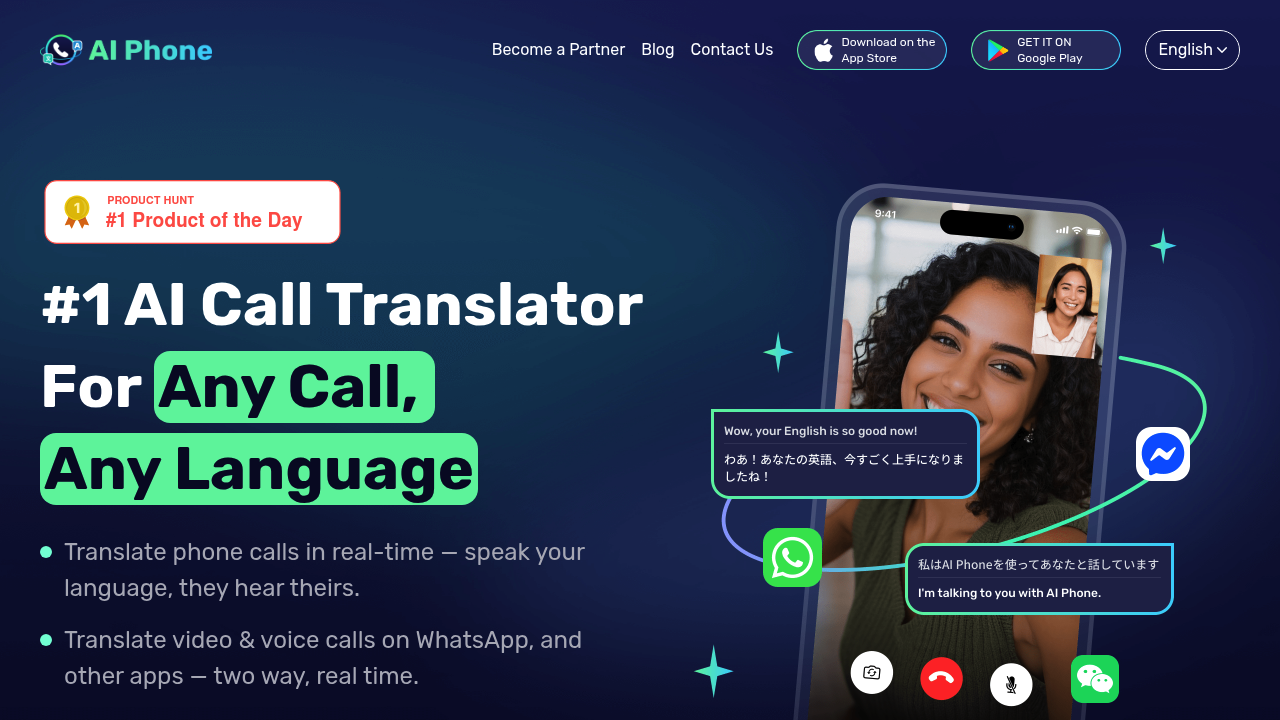
AI Phone (available at aiphone.ai) is a revolutionary AI-powered mobile application that breaks down language barriers through real-time translation technology. This innovative tool transforms phone communication by providing instant, two-way voice translation during live calls, enabling seamless conversations between people who speak different languages.
The app leverages advanced artificial intelligence and machine learning to deliver highly accurate translations across more than 150 languages and dialects. Whether you're making a traditional phone call or connecting via popular messaging apps like WhatsApp, WeChat, or Telegram, AI Phone ensures that language differences no longer stand in the way of meaningful communication.
Key Benefits and Use Cases
AI Phone offers several transformative benefits that make it an essential tool for various scenarios:
Real-Time Communication: Unlike traditional translation apps that require you to type or pause conversations, AI Phone translates speech instantly as you speak. Both parties can communicate naturally in their native languages without awkward delays or interruptions.
High Translation Accuracy: The platform excels at handling complex linguistic challenges including regional accents, dialects, slang, homophones, and mixed-language speech. The AI continuously learns from a massive multilingual dataset to stay current with evolving language patterns and expressions.
Versatile Application Scenarios: The tool serves multiple use cases:
- Business professionals conducting international negotiations and building global partnerships
- Travelers navigating foreign countries, booking hotels, ordering food, and getting directions
- Immigrants adapting to new countries and handling daily life situations
- International relationships helping couples and families communicate across language barriers
- Customer service enabling support teams to assist clients in their preferred languages
- Healthcare providers communicating with patients who speak different languages
Who Uses AI Phone
AI Phone has built a diverse user base of millions worldwide, including:
Business Professionals: Executives, sales teams, and entrepreneurs expanding into international markets rely on the app to conduct meetings, negotiate deals, and build relationships without the cost and scheduling constraints of human interpreters.
Travelers and Expatriates: People traveling abroad or relocating to foreign countries use AI Phone to navigate daily challenges, from making restaurant reservations to handling emergencies, making their international experiences smoother and more confident.
Multilingual Families: Families with members speaking different languages leverage the app to maintain connections and have meaningful conversations without language barriers creating distance.
Service Industry Workers: From real estate agents to construction site managers, professionals who work with diverse client bases use AI Phone to communicate effectively with Spanish-speaking, Chinese-speaking, and other non-English-speaking colleagues and customers.
What Makes AI Phone Unique
Several features distinguish AI Phone from other translation tools:
Voice-to-Voice Live Translation: Unlike text-based translators, AI Phone offers authentic voice translation where you speak naturally and the other person hears the translation in a natural-sounding voice, creating a more personal and engaging conversation experience.
Multi-Platform Video Call Translation: The app uniquely supports real-time translation for video and voice calls on WhatsApp, WeChat, Telegram, and other messaging platforms, with bilingual subtitles displayed on both screens simultaneously.
Smart Context Understanding: The AI recognizes technical terminology, business jargon, and context-specific phrases with high accuracy, making it reliable for professional and specialized conversations.
Call Management Features: Beyond translation, AI Phone includes practical tools like AI-powered call summaries, full transcripts for review, type-to-speak functionality for important details, and automatic highlighting of key points during conversations.
Comprehensive Translation Suite: In addition to call translation, the app offers voice translation, in-person conversation translation, photo translation for signs and documents, and text translation, making it an all-in-one communication solution.
Pricing Plans
AI Phone offers several subscription tiers to match different usage needs. Based on the latest available information, here are the current pricing options:
Available Plans
Free Trial: The app offers a free trial period to test the features before committing to a subscription.
Weekly Plans:
- AI Call Weekly Plan: $4.99/week
- AI Phone Number Weekly Plan: $6.99/week
Monthly Plans:
- AI Call Monthly Plan: $4.99/month
- AI Phone Number Monthly Plan: $9.99/month
Annual Plans:
- AI Phone Number Annual Plan: $59.99/year (discounted rate, approximately $5/month)
Credit Packages (for additional features or usage):
- Medium Credit Package: $12.99
- Large Credit Package: $29.99
The pricing structure is designed to provide flexibility, allowing users to choose between translation-only features or comprehensive packages that include virtual phone numbers, AI-assisted texting, and additional communication tools.
For the most current and detailed pricing information, please visit the official AI Phone website or check the app stores directly.
Disclaimer: Pricing plans are subject to change. The information provided here reflects available data as of the time of writing. Please verify current pricing on the official AI Phone platforms before making a purchase decision. Subscription terms may vary by region and platform (iOS vs Android).
Getting Started
System Requirements
To use AI Phone effectively, ensure your device meets these requirements:
Mobile Devices:
- iOS: Requires iOS 13.0 or later
- Compatible with iPhone, iPad, and iPod touch
- Android: Compatible with most modern Android devices
- Available on Google Play Store
Network Requirements:
- Stable internet connection (Wi-Fi or cellular data)
- For optimal translation quality, a strong connection is recommended
- The app uses approximately 227.4 MB of storage space on iOS
Permissions: The app requires certain permissions to function properly:
- Microphone access (for voice recognition and translation)
- Phone call access (for live call translation)
- Notification access (for call alerts and updates)
- Contact access (optional, for easier call management)
Basic Interface Navigation
When you first open AI Phone, you'll encounter an intuitive interface designed for easy access to key features:
Main Dashboard: The home screen provides quick access to:
- Call Translation Button: The primary feature for making translated phone calls
- Video Call Translation: For translating calls on WhatsApp and other apps
- Voice Translation: For instant voice-to-voice translation
- Conversation Mode: For in-person bilingual conversations
- Photo Translation: For translating text in images
- Text Translation: For written translation needs
Language Selection: Before making a call or using any translation feature:
- Tap the language selector at the top of the screen
- Choose your native language
- Select the target language you want to translate to/from
- The app supports over 150 languages and automatically detects dialects
Settings Menu: Access via the menu icon (typically three horizontal lines) to:
- Manage your subscription and billing
- Adjust translation preferences
- Configure call recording and transcription settings
- Set up your AI phone number (if subscribed)
- Review privacy settings and permissions
Profile Section: Manage your account details, view:
- Subscription status and renewal dates
- Translation history
- Call transcripts and summaries
- Credit balance (if applicable)
Core Features
Essential Functions Overview
AI Phone provides several powerful translation capabilities:
1. Live Phone Call Translation This flagship feature enables real-time translation during traditional phone calls. When you dial a number through the app, AI Phone acts as a live interpreter, instantly translating your words into the target language and translating the responses back to your language.
2. Video & Voice Call Translation Extend translation capabilities to your favorite messaging apps. By generating a shareable link, you can translate calls on WhatsApp, WeChat, Telegram, LINE, and over 20 other platforms. Both parties see bilingual subtitles on their screens.
3. Voice Translation For face-to-face conversations or situations where you need to translate spoken words without making a call, the voice translation feature captures speech and provides instant audio translation.
4. Conversation Mode This two-way translation mode is perfect for in-person discussions, allowing two people speaking different languages to have a natural conversation with the app facilitating real-time translation between them.
5. Camera Translation Simply point your camera at text (restaurant menus, street signs, documents, packaging) or upload a photo, and AI Phone will translate the visible text instantly using advanced OCR (Optical Character Recognition) technology.
6. Text Translation Type or paste text for quick translation between languages, useful for emails, messages, or any written content.
Basic Operations Tutorial
Making a Translated Phone Call:
- Open the AI Phone app
- Tap the "Call" or phone icon on the main screen
- Select your language (e.g., English)
- Select the recipient's language (e.g., Spanish)
- Enter the phone number you want to call
- Tap the call button
- Speak naturally in your language
- The app will translate your speech in real-time
- The recipient will hear your words in Spanish
- Their Spanish responses will be translated back to English for you
Setting Up Video Call Translation:
- Open AI Phone and navigate to "Video Call Translation"
- Choose your language and the target language
- Tap "Create Link" or "Generate Meeting"
- Share the generated link with the person you want to call
- When they click the link, they can join without downloading the app
- Start your video call on WhatsApp or your preferred platform
- Both of you will see bilingual subtitles in real-time
Using Voice Translation:
- Tap "Voice" or the microphone icon
- Select language pairs (your language and target language)
- Tap and hold the microphone button
- Speak your message
- Release the button to hear the translation
- For two-way conversation, toggle languages or use split-screen mode
Translating Photos:
- Select "Camera" or "Photo" from the main menu
- Take a new photo or select one from your gallery
- The app automatically detects text
- Select the source and target languages (or let auto-detect handle it)
- View the translated text overlaid on the image or in a separate text box
Common Settings Explained
Translation Quality Settings:
- Speed vs. Accuracy: Some apps allow you to prioritize faster translation or more accurate translation. For casual conversations, speed may be preferred; for important business calls, prioritize accuracy.
- Voice Selection: Choose from different AI voices for the translated audio output, including male/female voices and different accents.
Call Recording & Transcription:
- Auto-Recording: Enable automatic recording of translated calls for later review
- Transcription: Automatically convert calls to text for easy reference
- AI Summaries: Enable automatic call summaries that extract key points
Notification Preferences:
- Configure how you want to receive alerts for incoming calls
- Set up notifications for translation updates and new features
- Manage do-not-disturb hours
Privacy Settings:
- Call Logs: Choose whether to save call history
- Data Storage: Manage how long translations and recordings are stored
- Sharing Permissions: Control who can access your translations
Language Preferences:
- Set your default language
- Add frequently used language pairs for quick access
- Enable accent detection for more accurate translations
Second Number Settings (if subscribed):
- Configure your AI phone number
- Set up call forwarding
- Manage voicemail settings
- Configure business hours for automated responses
First Project Tutorial
Step-by-Step Walkthrough: Your First Translated Call
Let's walk through making your first translated phone call with AI Phone. For this example, we'll assume you speak English and want to call someone who speaks Spanish.
Step 1: Download and Install
- Download AI Phone from the App Store (iOS) or Google Play (Android)
- Open the app and complete the registration process
- Grant necessary permissions (microphone, phone, notifications)
Step 2: Choose Your Subscription
- Select a subscription plan that fits your needs
- Complete the payment process
- If available, start with the free trial to test features
Step 3: Configure Language Settings
- On the main screen, locate the language selectors
- Tap the first language selector and choose "English" (or your native language)
- Tap the second language selector and choose "Spanish" (or your target language)
- The app will remember these preferences for future calls
Step 4: Make Your First Call
- Tap the large "Call" button on the home screen
- Enter the phone number you want to call (include country code if international)
- Review the selected languages one more time
- Tap the dial/call button to initiate the call
Step 5: During the Call
- Wait for the recipient to answer
- Speak clearly and naturally in English
- The app will process your speech and translate it in real-time
- The recipient will hear your message in Spanish
- When they respond in Spanish, you'll hear it translated to English
- Continue conversing naturally - the app handles translation both ways
Step 6: Using Additional Features
- Type-to-Speak: During the call, if you need to communicate specific information (like addresses or names), tap the text input option, type the information, and it will be translated and read aloud
- Subtitles: Enable on-screen subtitles to see the translation in text form as well
- Pause Translation: If needed, you can pause translation temporarily to speak directly
Step 7: After the Call
- The call will end normally when either party hangs up
- Access the call summary by going to your call history
- Review the AI-generated summary of key points
- View the full transcript if needed
- Save important information for future reference
Tips for Best Results
Before Your Call:
- Test Your Connection: Ensure you have a strong internet connection (Wi-Fi is ideal)
- Check Audio Quality: Test your microphone in a quiet environment
- Prepare Context: For specialized conversations, familiarize yourself with key terms you'll need
- Verify Languages: Double-check that you've selected the correct language pair
During Your Call:
- Speak Clearly: Enunciate your words, but speak naturally - don't over-exaggerate
- Avoid Background Noise: Find a quiet location for better voice recognition
- Speak in Complete Phrases: Rather than single words, use complete sentences for better context
- Pause Between Sentences: Give the AI time to process and translate before starting your next thought
- Be Patient: There may be a slight delay (typically less than a second) for translation
For Important Conversations:
- Use Professional Language: Avoid excessive slang in critical business calls
- Verify Understanding: Ask clarifying questions to ensure the translation was understood correctly
- Enable Recording: For important calls, turn on call recording to review later
- Review Transcripts: After important conversations, check the transcript for accuracy
Improving Accuracy:
- Provide Context: If discussing specialized topics, verbally clarify context at the start ("We're discussing medical terminology" or "This is about legal contracts")
- Spell Important Names: For proper nouns, you can use the type-to-speak feature
- Avoid Idioms: Idioms may not translate well; use more direct language for clarity
- Speak Louder in Noisy Environments: Increase volume rather than getting closer to the phone
Troubleshooting Basics
Problem: Poor Translation Quality
- Solution: Check your internet connection speed
- Solution: Move to a quieter environment with less background noise
- Solution: Speak more clearly and at a moderate pace
- Solution: Verify you've selected the correct languages
- Solution: Try restarting the app
Problem: Significant Delay in Translation
- Solution: Switch from cellular data to Wi-Fi if possible
- Solution: Close other apps that might be using bandwidth
- Solution: Check if your device has sufficient storage space
- Solution: Ensure the app is updated to the latest version
Problem: Can't Make Calls
- Solution: Verify you have an active subscription
- Solution: Check that microphone permissions are enabled in device settings
- Solution: Ensure phone call permissions are granted
- Solution: Try making a regular call first to verify basic phone functionality
Problem: The Other Person Can't Hear Translation
- Solution: Check your device volume settings
- Solution: Ensure the speaker is enabled if on speakerphone
- Solution: Verify the app isn't muted
- Solution: Ask the recipient to check their volume
Problem: App Crashes or Freezes
- Solution: Force close the app and reopen it
- Solution: Clear the app cache in device settings
- Solution: Uninstall and reinstall the app
- Solution: Check for iOS/Android system updates
- Solution: Contact support at [email protected]
Problem: Billing or Subscription Issues
- Solution: Check subscription status in app settings
- Solution: Verify payment method is valid and current
- Solution: Review subscription through App Store or Google Play
- Solution: Contact support for billing disputes or questions
Problem: Translation Doesn't Recognize Accent
- Solution: The app supports multiple accent variations - try speaking slightly differently
- Solution: Use the text-to-speech function for difficult words
- Solution: Report persistent issues to support to help improve the AI
Best Practices
Recommended Workflows
For Business Calls:
- Schedule calls in advance and notify the other party you'll be using translation
- Enable call recording and transcription for record-keeping
- Keep a notepad handy to jot down action items during pauses
- Use the type-to-speak feature for critical data like contract numbers or dates
- After the call, review the AI summary and share it with team members
- Follow up with an email summarizing key points to confirm mutual understanding
For Customer Service:
- Set up your AI phone number with professional voicemail greetings
- Configure business hours to manage when calls are auto-answered
- Create quick reply templates for common questions
- Train team members on consistent usage to maintain service quality
- Archive important customer conversations for compliance and quality assurance
- Use call summaries to update CRM systems efficiently
For Travel:
- Download the app and set up your subscription before your trip
- Test the app with a friend before your departure
- Pre-configure common language pairs you'll need at your destination
- Use photo translation for menus, signs, and documents
- Save important phrases in the translation history for quick access
- Keep the app readily accessible on your home screen
For Daily Communication with Family/Partners:
- Introduce the other person to how the app works during your first call
- Be patient as you both adjust to the slight translation delay
- Schedule regular video calls using the video translation feature for a more personal connection
- Use voice messages during the day and translate them at your convenience
- Share translation history to reminisce about conversations
- Combine with language learning efforts to gradually reduce dependence on translation
Common Mistakes to Avoid
Mistake 1: Speaking Too Fast
- Many users rush through their words, which overwhelms the AI recognition system
- Solution: Speak at a normal, conversational pace with slight pauses between sentences
Mistake 2: Using Complex Idioms and Slang
- Phrases like "it's raining cats and dogs" or "let's touch base" may not translate accurately
- Solution: Use direct, literal language for important information
Mistake 3: Not Testing Before Important Calls
- Jumping into a critical business call without testing the app first
- Solution: Make a test call to a friend or colleague to ensure everything works properly
Mistake 4: Talking Over the Translation
- Starting to speak before the translation completes
- Solution: Wait for the translation to finish and allow a brief pause before responding
Mistake 5: Ignoring Poor Connection Warnings
- Continuing calls despite connectivity issues that degrade translation quality
- Solution: Pause the call, switch to better Wi-Fi, or reschedule if connection is unstable
Mistake 6: Forgetting to Enable Recording for Important Calls
- Missing the opportunity to review critical conversations later
- Solution: Make it a habit to enable recording before important business or legal calls
Mistake 7: Not Customizing Settings
- Using default settings that may not suit your specific needs
- Solution: Explore settings to adjust voice, speed, transcription preferences, and notification options
Mistake 8: Relying Solely on Auto-Detection
- Assuming the app will always detect languages correctly without manual selection
- Solution: Always manually verify and select both languages before important calls
Mistake 9: Not Reviewing Transcripts
- Missing potential misunderstandings that appear in the written transcript
- Solution: Quickly scan call transcripts after important conversations
Mistake 10: Ignoring Privacy Settings
- Leaving sensitive call recordings accessible or stored longer than necessary
- Solution: Configure privacy settings to auto-delete old calls and secure your data
Performance Optimization
Maximize Translation Accuracy:
- Update Regularly: Keep the app updated to benefit from improved AI models
- Train the AI: The more you use the app, the better it adapts to your speech patterns
- Provide Feedback: Report incorrect translations to help improve the system
- Use in Quiet Environments: Background noise significantly impacts accuracy
Improve Call Quality:
- Prefer Wi-Fi Over Cellular: Wi-Fi typically provides more stable connections
- Use Wired Headphones: Better audio input/output than phone speakers
- Close Background Apps: Free up device resources for optimal app performance
- Maintain Device Storage: Ensure adequate free space for app operation and temporary files
Reduce Data Usage:
- Download Language Packs: If available, pre-download frequently used languages
- Monitor Usage: Check data consumption in app settings
- Use Wi-Fi for Long Calls: Extended conversations consume more data
- Adjust Quality Settings: If available, lower translation quality to reduce data usage when necessary
Extend Battery Life:
- Reduce Screen Brightness: During calls, lower screen brightness
- Close Unused Features: Disable camera if only using voice translation
- Enable Power Saving Mode: Some devices have compatibility with power-saving features
- Use Power Bank: For extended travel or long conversation sessions
Organizational Tips:
- Label Contacts: Tag contacts with their preferred languages
- Create Favorites: Star frequently used language pairs for quick access
- Archive Old Calls: Regularly review and delete or archive old transcripts
- Sync Across Devices: If supported, use the same account on multiple devices for seamless access
Pros and Cons
Pros
1. Real-Time Translation The ability to have natural, flowing conversations in real-time without pausing to type or look up words revolutionizes cross-language communication. This is particularly valuable for time-sensitive discussions and spontaneous conversations.
2. Extensive Language Support With over 150 languages and dialects supported, including regional accents and variations, AI Phone covers the vast majority of global language needs, from major languages to less commonly supported dialects.
3. Multi-Platform Integration The capability to translate calls on WhatsApp, WeChat, Telegram, and 20+ other messaging platforms means you don't need to convince others to download a special app - they can use their preferred communication platform.
4. High Accuracy Advanced AI that handles accents, dialects, technical terminology, and contextual nuances provides reliable translation quality suitable for both casual and professional conversations.
5. Comprehensive Feature Set Beyond just call translation, the app offers voice translation, photo translation, text translation, conversation mode, call recording, transcription, and AI summaries - making it a complete communication solution.
6. Additional Communication Tools Features like virtual phone numbers, AI-assisted texting, call forwarding, and voicemail add significant value beyond translation capabilities.
7. User-Friendly Interface The intuitive design makes it accessible to users of all technical skill levels, with straightforward navigation and clear visual indicators.
8. Cost-Effective Alternative Compared to hiring human interpreters or professional translation services, the subscription cost provides tremendous value, especially for frequent users.
9. No Special Equipment Required Works with standard smartphones - no need for specialized hardware or additional devices.
10. Continuous Improvement The AI model is regularly updated and trained on new data, meaning translation quality improves over time.
Cons
1. Subscription Required Unlike some basic translation apps, AI Phone requires a paid subscription to access core features. There's no fully-featured free version for unlimited use, which may be a barrier for casual users.
2. Internet Dependency The app requires a stable internet connection to function. Poor connectivity leads to delays, reduced accuracy, or complete failure of translation services - problematic in areas with limited internet access.
3. Slight Translation Delay While described as "real-time," there is a noticeable delay (typically less than a second, but sometimes longer) that can make conversations feel less natural than speaking the same language directly.
4. Robotic Voice Quality Some users report that the translated voice sounds robotic or artificial, which can reduce the personal touch of conversations, especially in emotional or intimate discussions.
5. Privacy Concerns Since calls are processed through AI systems, there are inherent privacy considerations about your conversations being analyzed, even with strong privacy policies in place.
6. Accuracy Varies While generally accurate, the quality varies based on accent strength, background noise, specialized terminology, and language pairs. Some language combinations work better than others.
7. Limited Offline Capability The app provides minimal or no functionality without an internet connection, unlike some competitors that offer offline translation for downloaded language packs.
8. Customer Support Issues Some users report slow response times from customer support and difficulties getting help with technical issues or billing problems.
9. Auto-Renewal Confusion Several users have complained about unclear trial-to-paid transitions, with subscriptions auto-renewing without sufficient notice, leading to unexpected charges.
10. Second Number Limitations The virtual phone number feature has reported limitations, including inability to receive certain types of SMS (like verification codes), issues with call forwarding, and incompatibility with some messenger platforms.
11. Battery Consumption Extended use of translation features, especially during long calls, can significantly drain device battery life.
12. Learning Curve for Advanced Features While basic functions are straightforward, mastering all features (like setting up video call translation links, configuring business hours, or using type-to-speak) requires time and experimentation.
Summary
AI Phone represents a significant leap forward in breaking down language barriers and enabling seamless global communication. By leveraging cutting-edge artificial intelligence, the app transforms smartphones into powerful real-time interpreters that work across 150+ languages and integrate with popular communication platforms.
The core value proposition is compelling: instead of struggling through language barriers, paying expensive interpreter fees, or missing opportunities due to communication challenges, users can simply download the app and start conversing naturally with anyone, anywhere in the world. Whether you're a business professional expanding into international markets, a traveler navigating foreign countries, an immigrant adapting to a new home, or someone maintaining relationships across language boundaries, AI Phone provides a practical solution.
The app's strengths lie in its comprehensive feature set, high translation accuracy, user-friendly interface, and continuous improvements through AI learning. The ability to translate not just regular phone calls but also video calls on platforms like WhatsApp, combined with additional features like photo translation, transcription, and AI summaries, makes it a versatile tool that extends well beyond basic translation needs.
However, potential users should be aware of limitations including the subscription requirement, internet dependency, occasional translation delays, and varying accuracy levels depending on accents and contexts. The app works best with clear speech, good internet connections, and patience for the slight processing delay inherent in AI translation.
For those who frequently need to communicate across languages - whether for business, travel, personal relationships, or daily life - AI Phone offers substantial value that likely justifies the subscription cost. The time saved, opportunities unlocked, and connections enabled by removing language barriers can be transformative. However, casual users who only occasionally need translation services might find free alternatives sufficient for their limited needs.
As AI technology continues to improve, tools like AI Phone will only become more accurate, natural-sounding, and capable. Early adopters benefit not only from current capabilities but also from ongoing enhancements that make cross-language communication increasingly seamless. In a globalized world where the ability to communicate across languages is increasingly valuable, AI Phone positions itself as an essential tool for breaking down one of humanity's oldest barriers - the limitation of speaking only one language.
To learn more about AI Phone or start using the service, visit the official website at aiphone.ai or download the app from the App Store or Google Play Store.
Reviews
No reviews yetSimilar tools in category

Audyo
Convert text into realistic speech, including celebrity voice imitation, multilingual capabilities, and easy editing options.
Shownotes
Transform audio management with AI-powered transcription, summarization, and multilingual capabilities.

PodPilot
AI-powered podcast creation with easy production and smooth publishing across platforms.